

Appearance
Configuring External Access Permissions
Admin panel › App Permissions › Sintel Apps External
Sintel Apps keeps internal use (people in your organisation) and external or anonymous use apart. Each has its own Microsoft Entra ID application, and your tenant administrator approves each one separately.
| Internal use | External or anonymous use | |
|---|---|---|
| Entra ID application | Sintel Apps | Sintel Apps External |
| Needed | Always | Only if people outside your organisation use your forms |
| Permissions | Delegated: the app does only what the signed-in person may do | Application: the app works under its own identity, for people without an account in your tenant |
Internal use
This is the standard setup, done when Sintel Apps is added to your tenant. A tenant administrator approves the Sintel Apps permissions once. People then use Sintel Apps with their own Microsoft 365 permissions. The app never gives them more.
Do you need external access?
External access is a Sintel Apps feature, and it's optional. It doesn't use SharePoint guest access. It lets people outside your organisation submit a form, and come back to their item later. They never get access to your SharePoint site.
- Do people outside your organisation need to fill in forms?
- Do you want to share forms with anonymous links?
If not, you don't need anything else. If yes, continue.
Approve Sintel Apps External
- Open the Sintel Apps Admin panel at https://app.sintelapps.com/admin and select App Permissions.
- Under Optional, find Sintel Apps External. If it shows Not consented, copy its link.
- A tenant administrator opens the link and approves the permissions.
- Back on App Permissions, select Re-check. It now shows Consented.
The administrator can also use this link directly: https://login.microsoftonline.com/organizations/adminconsent?client_id=4d5a0f9f-7513-4bf1-86f7-c2c3f870f726.
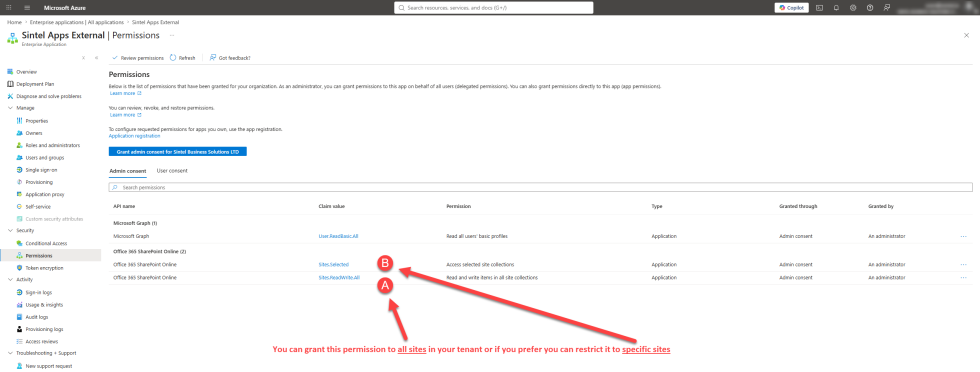
This creates an enterprise application named Sintel Apps External, with application permissions to Microsoft Graph and SharePoint Online.
When the consent is given, a confirmation page shows:

After that, the external access settings of your forms can be used. See External Access & Sharing. Internal permissions don't change, and you can remove external access at any time.
What Sintel Apps External does
- It lets external people create items in your lists without an account. Anyone can submit.
- Editing needs a check. People confirm their email address with a one-time code before they can change their item.
| Permission | Why |
|---|---|
| User.ReadBasic.All (Microsoft Graph) | Looks up basic user information, such as names and email addresses |
| Sites.ReadWrite.All (SharePoint) | Reads and writes items on the sites with external forms |
Recommended: limit the application to chosen sites. Your administrator can grant Sites.Selected instead of Sites.ReadWrite.All, and then give the application access to each site that has external forms.
Related: Admin Panel and App Permissions, External Access & Sharing.